
I did not discover this, I got it from a tweet that Rob Conery put out there. Thank you, Rob!
I don?t know if this is a Windows 7 hack or if this is available in other operating systems.
- Create a new folder on your desktop
- Name the new folder:
GodMode.{ED7BA470-8E54-465E-825C-99712043E01C}
The new folder will change into this icon.

Clicking your shiny new icon will result in a new window that gives shortcut access to the myriad of configuration and administration utilities in Windows that I always seem to need to hunt down.

Opening one of these nodes will provide direct access to the associated utils.
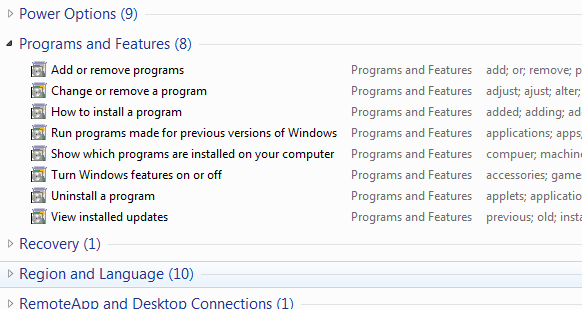
Weird and beautiful, isn?t it?
It makes me wonder what other Easter eggs are in there.
That is seriously cool. Or at least I though it was.
I created the folder, set the name, and it worked! Double clicked, started browsing the options and …
“Windows Explorer has stopped working…”
“Windows Explorer is restarting…”
I begin to suspect why this didn’t get doc’ed.
It’s just the Control Panel, presented differently: http://www.edbott.com/weblog/?p=2724
@John Sheehan
Yep – it’s just the GUID of the Control Panel. Not really an easter egg (you can just as well call the link “Satan’s Playground”. Just get the GUID right). Cool trick though.
There are more GUIDs here
@Noam
Great link. This is a better article on the subject than the one I slapped together.
http://www.howtogeek.com/howto/8711/stupid-geek-tricks-enable-the-secret-how-to-geek-mode-in-windows/
called guid (http://en.wikipedia.org/wiki/Guid) here are more
Recycle Bin: {645FF040-5081-101B-9F08-00AA002F954E}
My Computer: {20D04FE0-3AEA-1069-A2D8-08002B30309D}
Network Connections: {7007ACC7-3202-11D1-AAD2-00805FC1270E}
User Accounts: {60632754-c523-4b62-b45c-4172da012619}
Libraries: {031E4825-7B94-4dc3-B131-E946B44C8DD5}
Seems like a nice list of the Control Panel items displayed differently. Looks like a nice “folder” to have, but it’s hardly “God Mode”. Plus you can name the folder anything you like then just put the “.{guid}” after the name and it’ll become this magical folder.
True on all counts, guys. The best part is that I get to learn from comments on the blog. Nice!
This crashed my windows Desktop (on Vista) the moment I renamed the folder to ‘GodMode.{ED7BA470-8E54-465E-825C-99712043E01C}’.
Since I didn’t have the desktop I had to delete the folder through command prompt.
Didn’t work for me.
Again! Every day I stumble upon a dozen of these “god mode” articles. I wonder if they check before writing these articles, that there are already hundreds around.
write something original and useful, jeez.
very cool! works on Vista
Doesn’t work on XP sp3.
It works with Vista
Well, for Vista Business 64bit, it’s managed to completely screw the installation. Explorer is now on an infinite “crash/restart” loop, even in Safe Mode, and the folder itself has disappeared, so I can’t even delete it. I can’t invoke System Restore either since that requires access to the GUI and it’s screwed there.
Be warned.
Well, for Vista Business 64bit, it’s managed to completely screw the installation.
Ditto!!! Do not try on Vista 64bit!
God Mode smiteth Vista…
I am able to get around the infinite crash-loop in Vista by invoking some other program with a file explorer, like WinSCP (I figure it would also work with anything with a “File->Open” option) and deleting the file via its interface. You might have trouble starting up such a program in the first place if explorer is crashing, I use Launchy so I can manage to work around this and don’t even need to click anything.
If you do this on Vista and get the crash loop, you can fix it by the following:
1. When the crash message appears, go to the TaskManager (Alt Ctrl Delete)
2. File…Run… Type “cmd”
3. Navigate to the desktop folder
4. “rd GodMode.{ED7BA470-8E54-465E-825C-99712043E01C}”
5. …
6. Profit
Works fine in Windows 7! Very cool
Seems to work ok, not sure what all these buttons do…
@esa
The reason I originally documented this was so I would be able to look it up again for myself, but obviously others have benefited. Just look at the comments.
Further, there are real people on the other end of your comment. I don’t know why you feel it is ok to just flame someone for posting a harmless article. What do you care? Turn the channel.
I am not going to remove your comment, because I hope it reminds you in the future not to be so quick to criticize blindly.
@esa
The reason I originally documented this was so I would be able to look it up again for myself, but obviously others have benefited. Just look at the comments.
Further, there are real people on the other end of your comment. I don’t know why you feel it is ok to just flame someone for posting a harmless article. What do you care? Turn the channel.
this is great!!! thanks for posting! I never seen a real Easter Egg before.
Best thing I’ve read today, thanks for posting!
Tried this on Vista and it works, just like you said it!
Sweet….
@Andrew Wong
That’s cause it’s not really new. You could do this since Windows 95.
Check out the old tips.txt support article here:
http://support.microsoft.com/kb/135893
John
I have posted an amateur explanation for his behavior on my blog
http://kvangaveti.spaces.live.com/
messed up my windows vista, explorer (not IE) crashes over and over non stop HOW TO FIX!
@green91
Reboot in safe mode and rename the folder to something else. Reboot to windows normally and everything should be working again. The same thing happened to me. Crappy prank if you ask me.
Not wanting to jump on the PC bandwagon but — I find it offensive that everyone seems to call it GodMode. How about AllahMode, BuddaMode, DevilMode or SatanMode. I don’t think God gives a crap about how you run Windoes. Yes that’s a bit extreme but I find that the only folks it safe to offend are Christians. I called mine AdminMode — after all that’s kinda what it is.
Seems there is a problem with Vista 64. See this link for another way to create this.
http://www.windowsvalley.com/blog/create-a-master-control-panel-shortcut-and-explore-the-all-tasks/
It works in Vista business 32bit.
Very cool. Thanks for posting it.
—
Kevin C.
The first time I tried it with a folder it renamed two folders & one text document on my desktop. All 3 got a name with the word Godmode in it: “Godmode (2), Godmode.mkv & Godmode.txt” respectively. Has this happened with anyone else?
When I did this, it made the icon and everytime i click on it, it says windows explorer not responding then it restarts then seconds later it does it again, non stop forever. I cant open any pages that involve the explorer or it says not responding then closes
You can change God Mode to anything. The important thing is the dot and everything in the brackets.
This is also not an easter egg, but a feature. Microsoft will not include easter eggs in their products as a part of the Trustworthy Computing initiative.
Features are documented, easter eggs are not. Is there a reference for the documentation on this feature?
The end of the folder name refers to registry key:
HKEY_CLASSES_ROOT\CLSID\{ED7BA470-8E54-465E-825C-99712043E01C}
You can locate this exact info by selecting Control Panel from the start menet, and then selecting All Control Panel Items.
To understad why this works, you need to understand that the Windows system consists mostly of folders, ether real or virtual. When you place .{ED7BA470-8E54-465E-825C-99712043E01C} at the end of the folder name it tells Windows to give the folder that same properties of that classid.
There have been examples of this over time, and each time it’s hailed as a ‘secret’ trick. The only new thing is finding the classid 🙂
http://www.chami.com/tips/windows/103096W.html
http://aroundcny.com/Technofile/texts/bkcpltricks197.html
http://www.thehackerslibrary.com/?p=21
At least the concept is documented: http://msdn.microsoft.com/en-us/library/cc144096(VS.85).aspx
@Scott
That happened to me, also, and I started freaking out until I did system restore (just for safety) and had my dad rename the file and delete it in Safe Mode (w/ Command Prompt), it took a while, but I was able to salvage my Desktop.