
This article demonstrates the absolute minimum effort necessary to begin logging messages from within your application using Microsoft?s Enterprise Library 4.1.
I will include only a few details about what is happening under the covers, this is simply a HOW TO for getting that first logging message out there from a C# code file.
Installing Enterprise Library
Download and install the Enterprise Library 4.1. Realize that you are getting and installing a lot more than a logging library here. Be patient.
Creating a new Visual Studio project
- Open Visual Studio.
- Select New | Project | Visual C# | Console Application
- Name the project something appropriate like HelloWorldEntLibLogging
Adding a reference to the Ent. Lib. logging assembly
- In Solution Explorer, right click the project node and select Add Reference.
- On the .NET tab, select Enterprise Library Logging Application Block
as shown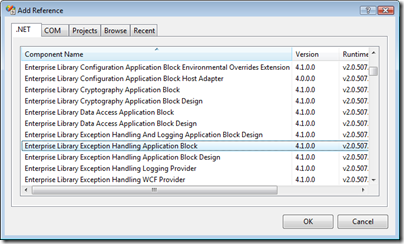
- Click OK.
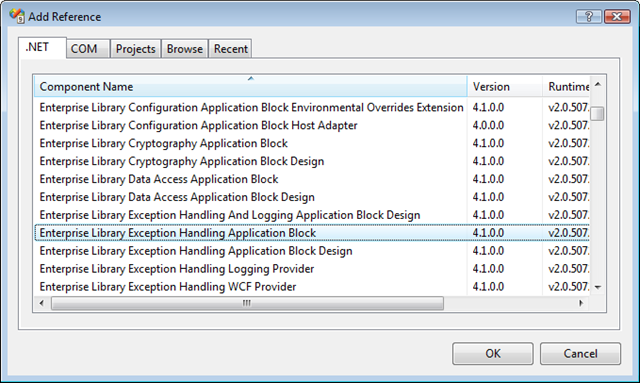
Configure Logging for the Application
Much of EntLib?s functionality is specified through configuration. Logging is no exception. Here, you?ll add an application configuration file to the project and add configuration information to it with the Visual Studio add-in that the EntLib installer added to Visual Studio.
- In Solution Explorer, right click the project node and select Add | New Item.
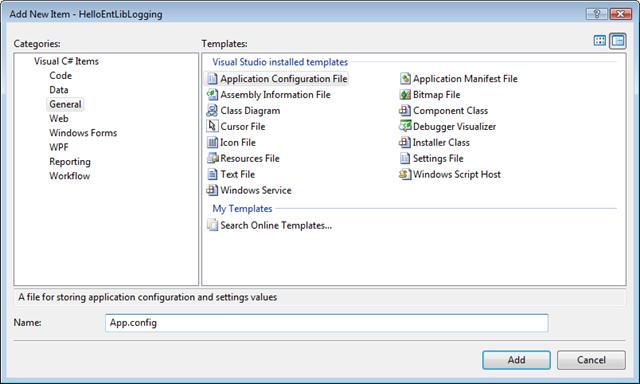
- Select Visual C# Items | General | Application Configuration File
- Leave the filename App.config as shown
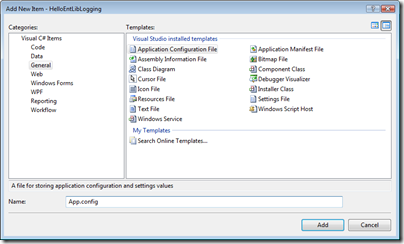
- Click Add
- Open app.config in the XML editor (double click it in Solution Explorer) and note that it is empty. You should see something like this:
1: <?xml version="1.0" encoding="utf-8"?>
2: <configuration>
3: </configuration>
- Close app.config.
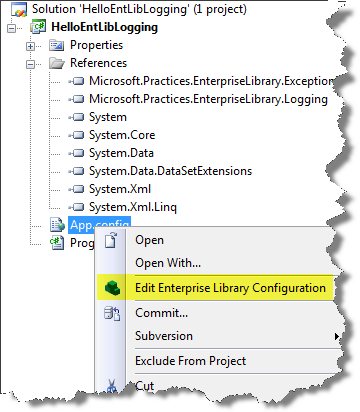
- Right click app.config in Solution Explorer and select Edit Enterprise Library Configuration as shown:
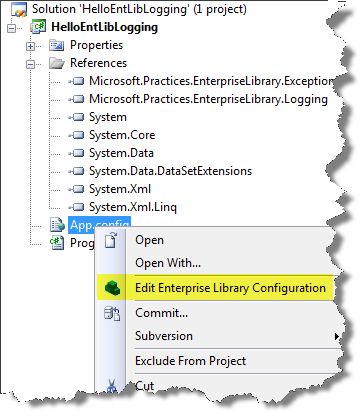
The Enterprise Library Configuration Editor opens.
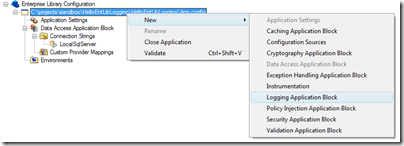
- Right click the app.config node in the editor and select New | Logging Application Block as shown:
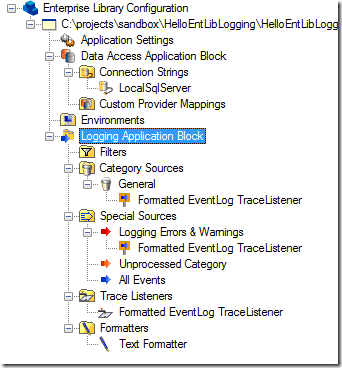
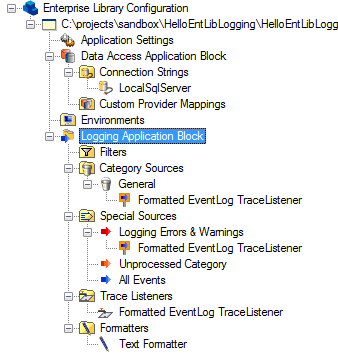
A new Logging Application Block node is added to the configuration editor as shown:
- Close the app.config visual editor window.
- Double click app.config in Solution Explorer to open it in the XML editor. You can see the configuration XML added for the logging block.
1: <?xml version="1.0" encoding="utf-8"?>
2: <configuration>
3: <configSections>
4: <section name="loggingConfiguration" type="Microsoft.Practices.EnterpriseLibrary.Logging.Configuration.LoggingSettings, Microsoft.Practices.EnterpriseLibrary.Logging, Version=4.1.0.0, Culture=neutral, PublicKeyToken=31bf3856ad364e35" />
5: <section name="dataConfiguration" type="Microsoft.Practices.EnterpriseLibrary.Data.Configuration.DatabaseSettings, Microsoft.Practices.EnterpriseLibrary.Data, Version=4.1.0.0, Culture=neutral, PublicKeyToken=31bf3856ad364e35" />
6: </configSections>
7: <loggingConfiguration name="Logging Application Block" tracingEnabled="true"
8: defaultCategory="General" logWarningsWhenNoCategoriesMatch="true">
9: <listeners>
10: <add source="Enterprise Library Logging" formatter="Text Formatter"
11: log="Application" machineName="" listenerDataType="Microsoft.Practices.EnterpriseLibrary.Logging.Configuration.FormattedEventLogTraceListenerData, Microsoft.Practices.EnterpriseLibrary.Logging, Version=4.1.0.0, Culture=neutral, PublicKeyToken=31bf3856ad364e35"
12: traceOutputOptions="None" filter="All" type="Microsoft.Practices.EnterpriseLibrary.Logging.TraceListeners.FormattedEventLogTraceListener, Microsoft.Practices.EnterpriseLibrary.Logging, Version=4.1.0.0, Culture=neutral, PublicKeyToken=31bf3856ad364e35"
13: name="Formatted EventLog TraceListener" />
14: </listeners>
15: <formatters>
16: <add template="Timestamp: {timestamp}
Message: {message}
Category: {category}
Priority: {priority}
EventId: {eventid}
Severity: {severity}
Title:{title}
Machine: {machine}
Application Domain: {appDomain}
Process Id: {processId}
Process Name: {processName}
Win32 Thread Id: {win32ThreadId}
Thread Name: {threadName}
Extended Properties: {dictionary({key} - {value}
)}"
17: type="Microsoft.Practices.EnterpriseLibrary.Logging.Formatters.TextFormatter, Microsoft.Practices.EnterpriseLibrary.Logging, Version=4.1.0.0, Culture=neutral, PublicKeyToken=31bf3856ad364e35"
18: name="Text Formatter" />
19: </formatters>
20: <categorySources>
21: <add switchValue="All" name="General">
22: <listeners>
23: <add name="Formatted EventLog TraceListener" />
24: </listeners>
25: </add>
26: </categorySources>
27: <specialSources>
28: <allEvents switchValue="All" name="All Events" />
29: <notProcessed switchValue="All" name="Unprocessed Category" />
30: <errors switchValue="All" name="Logging Errors & Warnings">
31: <listeners>
32: <add name="Formatted EventLog TraceListener" />
33: </listeners>
34: </errors>
35: </specialSources>
36: </loggingConfiguration>
37: </configuration>
This can look intimidating the first time you see it. There is a lot of XML in there and that stays pretty true to the idea that with flexibility comes complexity. Ignore all this for now and just close the XML editor window.

Adding Logging Code to the Application
OK, the application is all configured up to work with logging and the dependencies are linked in. Time to code.
- Open Program.cs in the code editor.
- Add the highlighted using statement at the top of the code file.
- Inside the Main method, instantiate a new LogEntry object and set its Message property to something appropriate, like ?Hello EntLib Logging?.
- Use the static Logger.Write() method to submit the LogEntry for logging.
using Microsoft.Practices.EnterpriseLibrary.Logging;
Your code should look similar to this:
class Program
{
static void Main(string[] args)
{
LogEntry entry = new LogEntry()
{
Message = "Hello Ent. Lib. Logging"
};
Logger.Write(entry);
}
}
You?ve done it! Your very first EntLib logging application.
Running the Application and Validating the Logging
- Press F5.
The application runs under the debugger and exits quickly, just flashing a command window. - Open the Windows Event Viewer.
I am running on Windows 2008 Server, so I just Start ?Event Viewer?
- Open the application event log and view recent events.
You should see an informational event logged to the Windows Event Log as shown below.
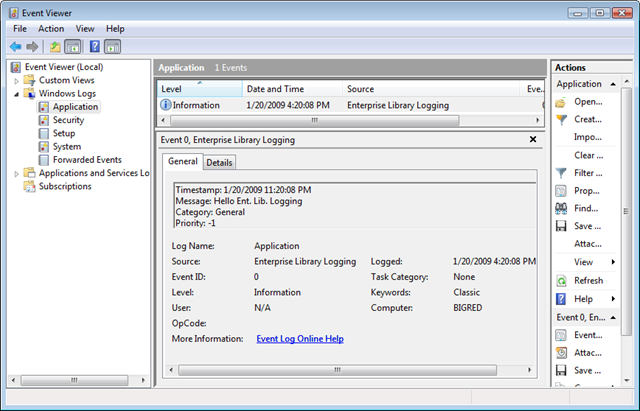
The details of the information logged will look much like this:
Timestamp: 1/20/2009 11:20:08 PM
Message: Hello Ent. Lib. LoggingCategory: General
Priority: -1
EventId: 0
Severity: Information
Title:
Machine: BIGRED
Application Domain: HelloEntLibLogging.vshost.exe
Process Id: 5384
Process Name: C:\projects\sandbox\HelloEntLibLogging\HelloEntLibLogging\bin\Debug\HelloEntLibLogging.vshost.exe
Win32 Thread Id: 4512
Thread Name:
Extended Properties:
Although you can greatly control and extend the information logged here, we?ll save that for another time. For a simple ?gee whiz? try this.
Up the severity of you LogEntry when it is instantiated like this:
LogEntry entry = new LogEntry()
{
Message = "Hello Ent. Lib. Logging",
Severity = TraceEventType.Critical
};
Now when you run the app, you get a really bad log entry :).
Nice summary. I’ve been trying to fight the “Entlib’s too complicated” meme for a while now, and stuff like this really helps.
Having said this, I’d like to mention that this is, in fact, NOT the bare minimum code. Instead of creating a separate LogEntry object you can just do:
Logger.Write(“See, even simpler!”);
There are a bunch of overloads on Logger to do severity, categories, etc. without requiring an explicit LogEntry.
NICE POST!
I can\’t wait til he goes on tour again!!!! Im definitely in there!!! I hope they takin a break. They need time away from each other.
This is quite a hot info. I think I’ll share it on Twitter.
uuu
Hey david , Gr88 post !
Secondly could you just help out with writing the LogWriter to write in an xml file or a text file ?