
I have a set of PowerShell build scripts and ran into a case where I needed to load an assembly (to get the assembly?s version) and still (at a later time) work with the assembly file on disk.
A typical way to load an assembly within PowerShell is to use the Assembly.LoadFrom(filePath)
# Powershell
[System.Reflection.Assembly]::LoadFrom($assemblyPath)
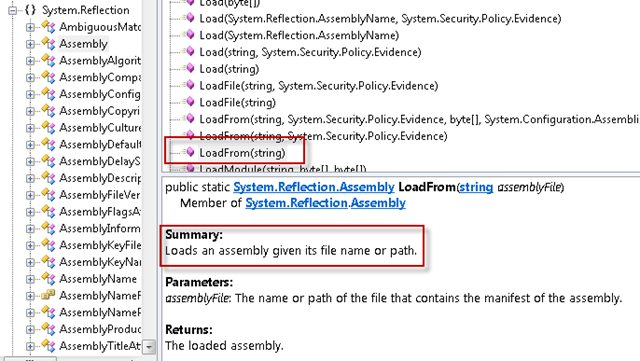
Except the problem with this (in my case) was it would lock the file for the lifespan of the PowerShell console instance. I didn?t want to have to close and re-open the PowerShell console every time I need to run a build so there had to be a work-around for this.
After searching the web for a solution, I couldn?t find anything that was ?easy? and worth the effort to get it to work.
EX: One solution was to create a new AppDomain, do the necessary work and the close the AppDomain which would release the lock on the file.
I?ve never done this myself, and even thought there is example code out there to get this accomplished, it just seemed over the top for what I was trying to do, and back to my previous criteria it wasn?t ?worth the effort to get it to work?
Then I remembered in a previous life I used an overload that took an array of bytes to load the an assembly.
[System.Reflection.Assembly]::Load($assemblyBytes)
After spiking it in PowerShell with the below test. I was quite happy with the solution, so I thought I?d throw it out there.
Just stream the assembly from disk into a byte array manually, and call assembly load from there.
Here?s my test case which shows that the file is not locked after it was loaded into the PowerShell runtime
$file = ".\Moq.dll"
$tempFileName = ".\Moq-Renamed.dll"

$fileStream = ([System.IO.FileInfo] (Get-Item $file)).OpenRead();
$assemblyBytes = new-object byte[] $fileStream.Length
$fileStream.Read($assemblyBytes, 0, $fileStream.Length);
$fileStream.Close();

$assemblyLoaded = [System.Reflection.Assembly]::Load($assemblyBytes);

# notice that we can move the file on disk after
# it's loaded into the powershell runtime
Move-Item $file $tempFileName
Move-Item $tempFileName $file

# and display the assembly information to show we still have it in memory
echo $assemblyLoaded
After that test passed, and the main reason I wanted to do this, I wrote the ?get-assembly-version? PowerShell function.
function get-assembly-version() {
    param([string] $file)

    # load the assembly bytes quickly - as to not lock the file for too long
    $fileStream = ([System.IO.FileInfo] (Get-Item $file)).OpenRead()
    $assemblyBytes = new-object byte[] $fileStream.Length
    $fileStream.Read($assemblyBytes, 0, $fileStream.Length) | Out-Null #out null this because this function should only return the version & this call was outputting some garbage number
    $fileStream.Close()

    # return the version of the assembly
    [System.Reflection.Assembly]::Load($assemblyBytes).GetName().Version;
}

$version = get-assembly-version(".\Moq.dll")

echo "Loaded v$($version.Major).$($version.Minor).$($version.Build).$($version.Revision) version of $file"
Hope this helps someone out there!
UPDATE:
Martin commented below on a much better solution to the assembly version info problem. Amazing how complicated we can make things if we don?t know the path.
function get-assembly-version() {
    param([string] $file)

    $version = [System.Reflection.AssemblyName]::GetAssemblyName($file).Version;

    #format the version and output it...
    $version
}
I too once ran into the problem that .Net does not have an Unload assembly function. I ended up spawning a new process to do the load of the assembly and examine it, and then let that process die.
With your technique the assembly remains loaded, I assume.
1. This can have storage implications – if you need to do this for hundreds or thousands of assemblies you’ll run out of storage, right?
2. In a product build situation where you build an assembly and want to load it and examine the result, and then maybe rebuild it and re-load it, I’m wondering what will happen the second time you try to load it and the previous copy is still loaded?
Thanks for the article.
If it’s just for getting the assembly version you could also use
[System.Reflection.AssemblyName]::GetAssemblyName(string file)
It opens, reads and closes the assembly to get the version information, but does not add it to the app domain.
@Rennie – I can’t say I know exactly how powershell was handling the loading of multiple dll’s into the same session. I did, however, notice that it was picking up the new “version” every time my build ran and did not get the “cannot load assembly because it already exists in the app domain” exception.
Thanks to @Martin, my get-assembly-version has been updated with his great suggestion.
Here’s a simpler way to read a file’s bytes: $bytes = [io.file]::ReadAllBytes($path)
What happens if the assembly you are loading depends on types defined in another assembly that has not yet been loaded?
I seem to recall I had issues with this when I did the workaround of loading a byte array in the past.