
If you?ve taken the jump to try out the new Entity Framework Code First and you?re allowing it to generate your database for you, you?ve most certainly run into the lack of migrations/updating existing schema support. Currently EF Code First will only create a database and won?t update a database with changes necessary to bring it in line with your model. I know they?re working on it, but since it?s not there, I thought I?d share a possible solution, albeit less polished than some of the well known database change management out there.
Where is the tool?
You can access it in the VS Command window. On my x64 machine the tool is in.
C:\Program Files (x86)\Microsoft Visual Studio 10.0\VSTSDB\Deploy\vsdbcmd.exe
I want to deploy an existing schema to AppHarbor.
Some high level steps that you can use for deployment of database changes.
- Generate an original reflection of your database. (*.dbschema file)
- Tiny little hack to the .dbschema file.
- Generate the change file to AppHarbor
- Review Change Script Generated
- Take the app offline. (optional)
- Apply Change Script
- Bring the app online (mandatory if you took step 5)
Generate an original reflection of your database.
This file is a complete reflection of your databases schema in a single xml file.
The following command can be used to generate this file.
vsdbcmd.exe
/Action:Import
/ConnectionString:"Data Source=.\sqlexpress;Initial Catalog=MyDatabase;Integrated Security=True;Pooling=False"
/ModelFile:MyDatabase.dbschema
There are a ton of knobs to turn with this command line tool. Feel free to check out the docs http://msdn.microsoft.com/en-us/library/dd193283.aspx
Now you should have a file ?MyDatabase.dbschema? sitting on your hard drive.
Tiny little hack to the .dbschema file.
The section of xml we want to manually remove from the file is related to where your mdf and ldf database files should exist on disk. When we go to deploy up to AppHarbor, if this is not removed, then vsdbcmd will generate script to attempt to move the files into the ?correct? location. This operation will throw exceptions if you attempt to execute against AppHarbor as you don?t have permission to do this. We?re removing it from the xml file, as I can?t seem to get the correct command line option to ignore this (if there is an option). So by removing it, it?s just not used and completely ignored.
I don?t know if this will be true for everyone, but I find that the last two sections of xml in the dbschema file are all I have to remove. I?ll show the two full sections below so you can use it as a reference of what to remove from the file.
<Element Type="ISql90File" Name="[MyDatabase]">
    <Property Name="FileName" Value="$(DefaultDataPath)$(DatabaseName).mdf" />
    <Property Name="Size" Value="2304" />
    <Property Name="SizeUnit" Value="3" />
    <Property Name="FileGrowth" Value="1024" />
    <Property Name="FileGrowthUnit" Value="3" />
    <Relationship Name="Filegroup">
        <Entry>
            <References ExternalSource="BuiltIns" Name="[PRIMARY]" />
        </Entry>
    </Relationship>
</Element>
<Element Type="ISql90File" Name="[MyDatabase_log]">
    <Property Name="FileName" Value="$(DefaultLogPath)$(DatabaseName)_log.LDF" />
    <Property Name="Size" Value="576" />
    <Property Name="SizeUnit" Value="3" />
    <Property Name="MaxSize" Value="2097152" />
    <Property Name="IsUnlimited" Value="False" />
    <Property Name="FileGrowth" Value="10" />
    <Property Name="FileGrowthUnit" Value="1" />
    <Property Name="IsLogFile" Value="True" />
</Element>
Generate the change file to AppHarbor.
Now that we have a .dbschema file containing the complete model of what we want deployed, we can now use it to generate a schema change deployment script.
vsdbcmd.exe
/Action:Deploy/DeployToDatabase:-
/Script:Test.sql
/ConnectionString:"{YourAppHarborConnectionString}"
/ModelFile:HackIt.dbschema
/Properties:TargetDatabase={YourAppHarborDatabaseName EX:db1235}
I?ll explain a couple of the above command options.
/DeployToDatabase:-
This one is _key_. This tells vsdbcmd to only generate a change script, and not to actually deploy the changes immediately. Until you feel comfortable with what sql the tool generates, which is usually pretty darn good, you should not apply it immediately. Allow the tool to generate the file for further inspection and you can execute it manually after.
/Script:Test.sql
This this is just the name of the file to dump the deployment changes.
/ModelFile:HackIt.dbschema
The path to the .dbschema we generated and modified above.
Review Change Script Generated.
After you?ve generated a change script file, take a look at the sql just to make sure you?re happy with what it generates.
Take the app offline. (optional)
This one depends on the schema changes. If the changes are serious enough, you can check in an App_Offline.htm file at the root of web project and do a ?git push appharbor?. This way, while making schema changes you don?t have to worry about the errors popping up on users. Down side is your site becomes inoperable.
If you?ve never heard of the App_Offline.htm ? I?d recommend reading up on it. http://weblogs.asp.net/scottgu/archive/2006/04/09/442332.aspx
Apply Change Script.
You have several options to actually apply the scripted changes.
- Use vsdbcmd to deploy ? Just turn the /DeployToDatabase:– to /DeployToDatabase:+ and allow vsdbcmd to apply the script right there.
- Use SQL Management Studio.
Make Sure you turn on SQLCMD Mode
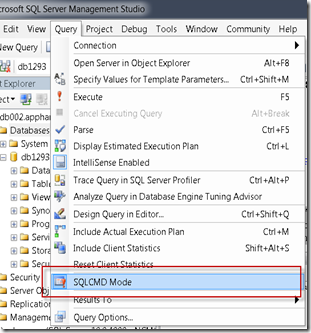
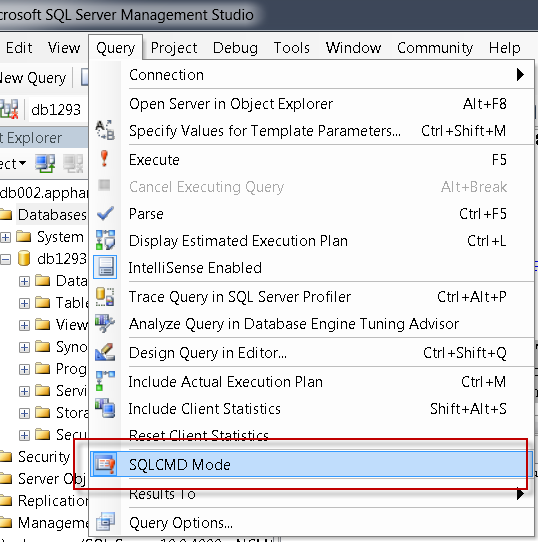
Bring your site back online.
Now you can go re-name the App_Offline.htm to something like App_Offline.htm.disabled and push those changes back up to AppHarbor.
Other considerations.
- Consider a simple migrations framework (EX: DbUp) to get some initial data or things initialized, but be-ware that you?ll have to think a little harder about the ?rollback? steps with this approach.
- Next you could take a look at an inquiry I made on the public support discussion list at AppHarbor hoping to push AppHarbor to implement this App_Offline.htm support (right into their admin site)
http://support.appharbor.com/discussions/problems/373-deployment-feature-ideaUPDATE: SPARE A VOTE OR TWO: http://feedback.appharbor.com/forums/95687-general/suggestions/1686365-add-feature-to-push-an-app-offline-htm-at-the-clic
One great benefit of to this approach is the ability for vsdbcmd to manage changes to an existing schema.
Now if you want full support like refactorings such as table, column, etc renames. You will want to keep a full db project and use that to do a deployment.
Hope you find this useful. Happy Deployment!