Silverlight 4 WebCam – at a glance
WebCam support in Silverlight 4 is a much anticipated feature, and probably didn?t come as much of a surprise. It?s relatively simple to enable this feature. The below example shows a simple UI with the code to enable the webcam. This post does not cover multiple webcams, however calling CaptureDeviceConfiguration.GetAvailableVideoCaptureDevices returns a list of all available webcams.
First create a simple UI (a Rectangle and a Button).
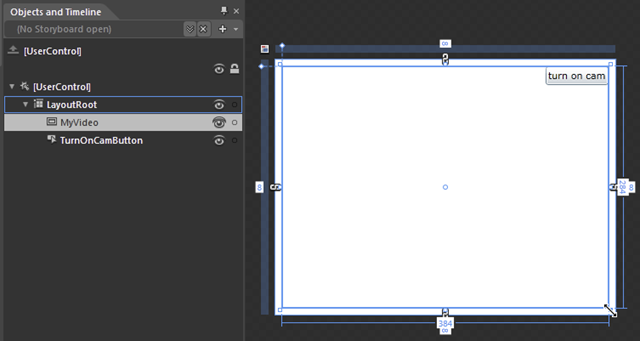
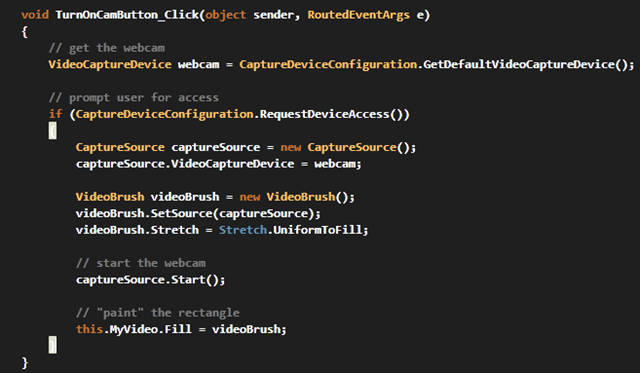
Add an event to the button click event. The logic looks like this:
- Get a handle on your video capture device using CaptureDeviceConfiguration.
- Request access to the device with CaptureDeviceConfiguration.RequestDeviceAccess().
- If the user clicks Yes, then create a CaptureSource object and set the VideoCaptureDevice to the selected webcam.
- Create a VideoBrush
- Set the Source of the VideoBrush
- Start the webcam
- Paint the Rectangle (this could be anything that takes a Brush)
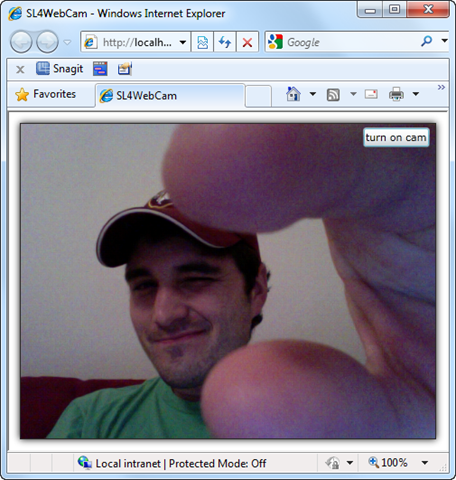
Next step, F5 (run your app). You?ll be looking at a blank screen with a button. After clicking the button, a box appears prompting the user to allow access to the webcam and microphone. Click Yes, since after all that is our goal ;).

Voil?!! You are now looking at yourself. Now you can do all sorts of fun web cam stuff. Enjoy.
Tip
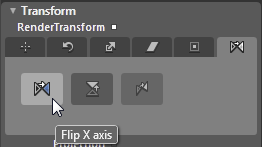
After running the above app, I noticed it was backwards. Meaning when I moved left my face on the screen moved to my right. Maybe it?s just me, but my brain was not happy about this. Instead, I wanted the app to respond like a mirror. To do this was a quick fix; simply Flip the Rectangle on the X axis. Here is the menu in Blend to do this:
More info
For more information, Tim Heuer has a great video covering Web cam and microphone support in detail: http://silverlight.net/learn/videos/all/access-web-camera-microphone/







Good!
But how do you stream it to a remote user?
yes i want to know how can i stream it to remote user with streaming media server
Is webcam motion tracking is possible in Silverlight just it is possible in Flash AS3 ?
http://blog.soulwire.co.uk/flash/actionscript-3/webcam-motion-detection-tracking/
this was kick ass, i pissed myself alittle.
If you just need web camera, use web camera and save image. see glo6.com/camera1.aspx